
A Simple Way to Customize the Look of Your Facebook Group
Learn how a few simple Facebook Group appearance settings can help your community feel more polished, professional, and aligned with your brand.
Learn how a few simple Facebook Group appearance settings can help your community feel more polished, professional, and aligned with your brand.

Your phone already has a built-in feature that can reduce blue light and make your screen more comfortable in the evening. Learn how to schedule Night Shift (iPhone) or Night Light (Android) so it works automatically in the background. 🌙📱

Learn how to use your phone's built-in Text Replacement feature to instantly insert your email address, website, favorite responses, and more with just a few keystrokes. It's one of the simplest productivity tips you'll ever use—and it can save you time every single day. 💛

If your Canva account is full of files named "Copy of Copy of Copy," this simple habit can save you time and frustration every single week.

AI doesn't replace me. It helps me save time. Here are three practical ways I use AI in my business for brainstorming, repurposing content, and improving my writing.
One of the easiest ways to make your Facebook Group look more professional is by creating a custom URL. Here's why it matters and how to set it up in just a few minutes.
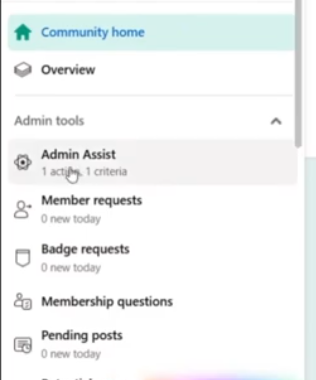
Admin Assist is one of my favorite Facebook Group features because it can automatically handle repetitive administrative tasks. Learn how this simple tool can save time and simplify group management.

Canva templates can save time, reduce overwhelm, and make content creation easier. Learn why starting with a template is one of my favorite Canva shortcuts.

Learn three simple Facebook Group settings that can make your group look more professional and save you time managing members.
Did you know your phone can recognize text inside a photo? Learn how to use Live Text to copy information, open websites, send emails, and save time.